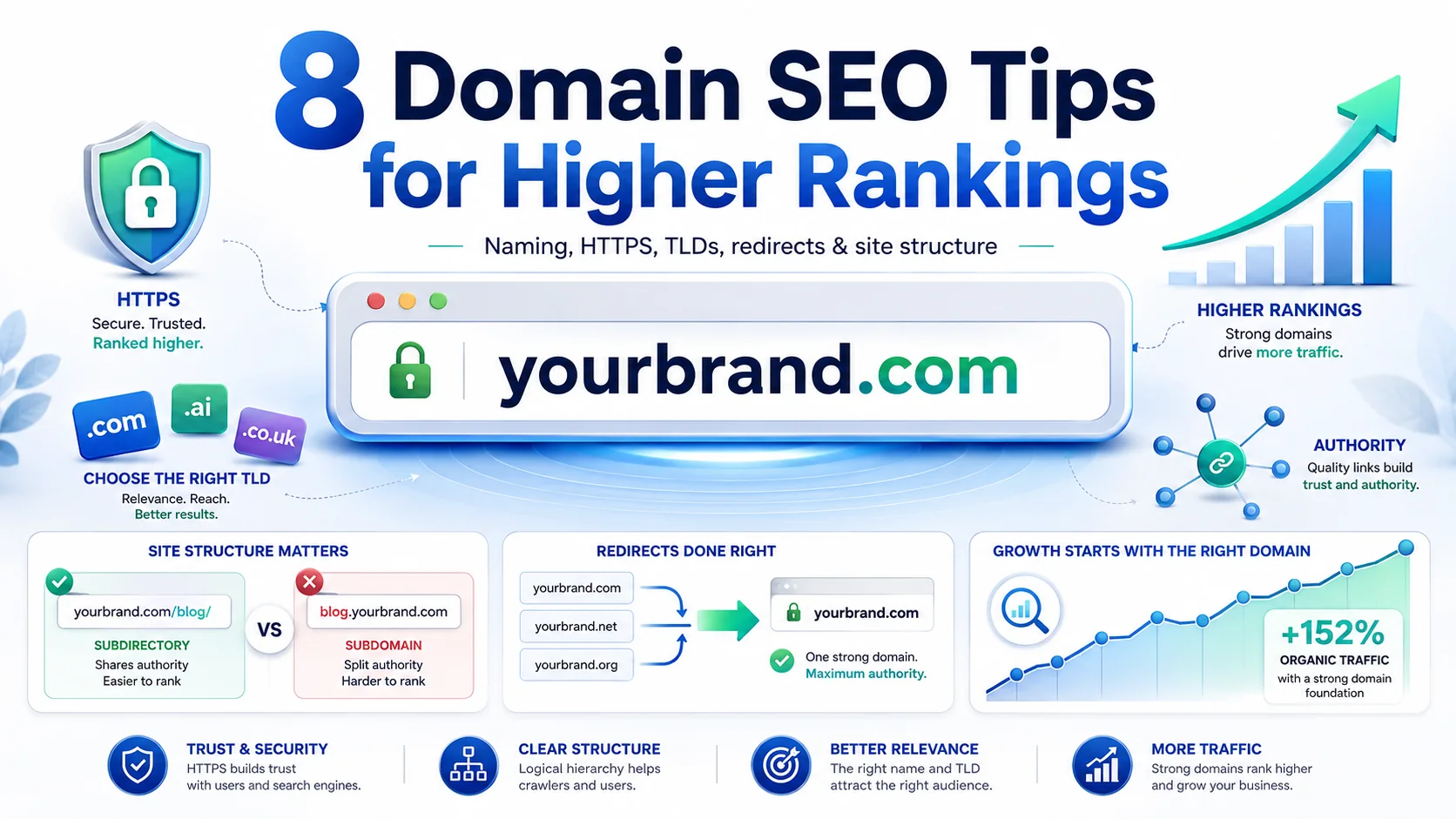
Most site owners treat domain setup as a one-time decision made at launch and never revisited. That's a costly mistake. Your domain isn't just an address — it's the foundation every SEO signal you build is stacked on. Get it wrong and you're fighting the algorithm with one hand tied behind your back. Get it right and you inherit structural advantages your competitors can't easily copy.
This guide covers eight expert-level domain optimization moves: from naming and TLD selection to authority building, redirect hygiene, and the subdomain trap that quietly tanks thousands of sites every year. Each tip is backed by current data and written so you can act on it today.
Key Takeaways
- In 2025, nearly 44% of all websites worldwide ran on .com, giving it the highest memorability score of any TLD (Statista).
- The #1 Google result averages a Domain Authority of 71 — 45% higher than a position-10 result (RankTracker, 2025).
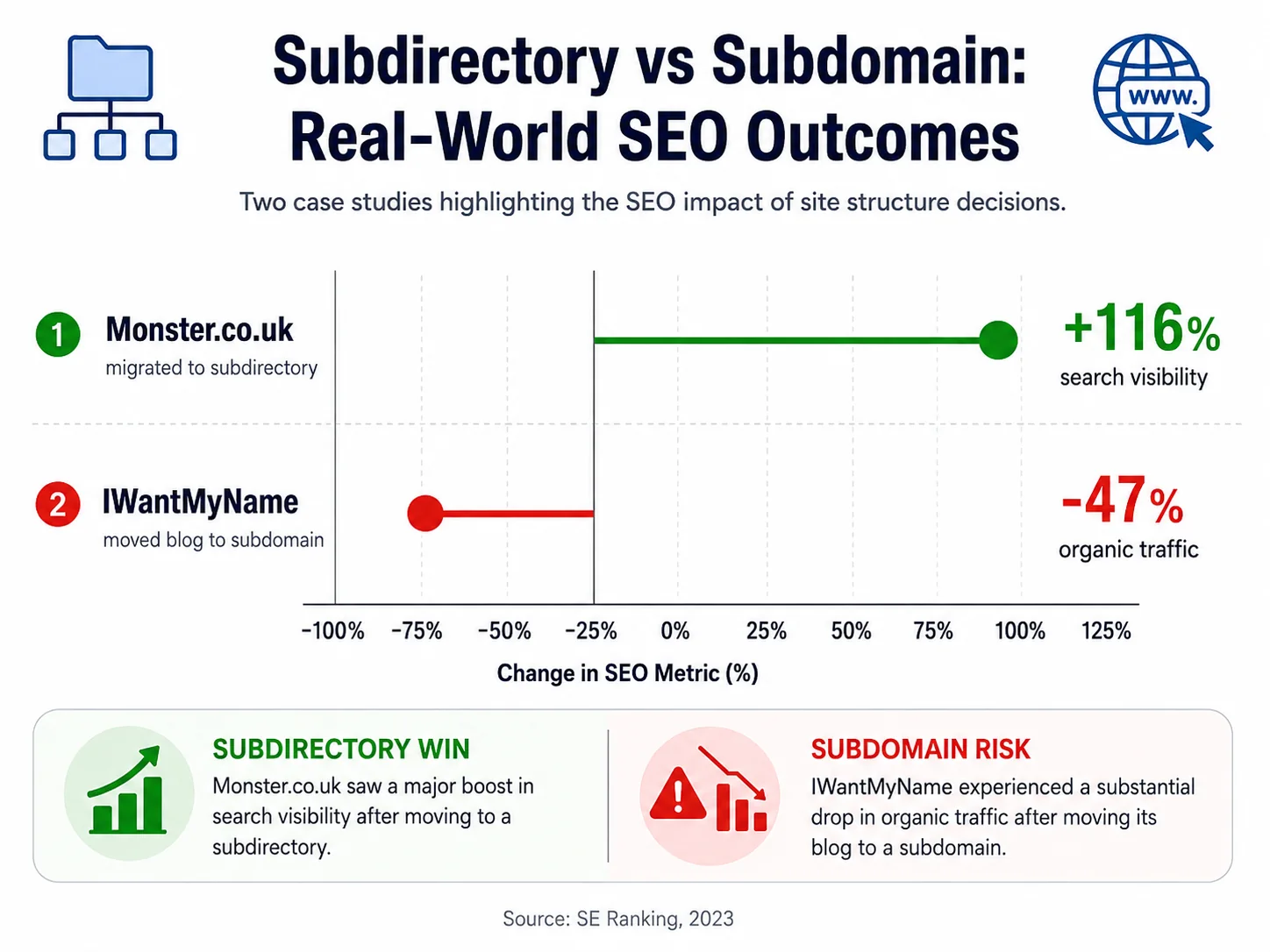
- Subdirectories beat subdomains: Monster.co.uk saw 116% more search visibility after migrating blog content off a subdomain (SE Ranking).
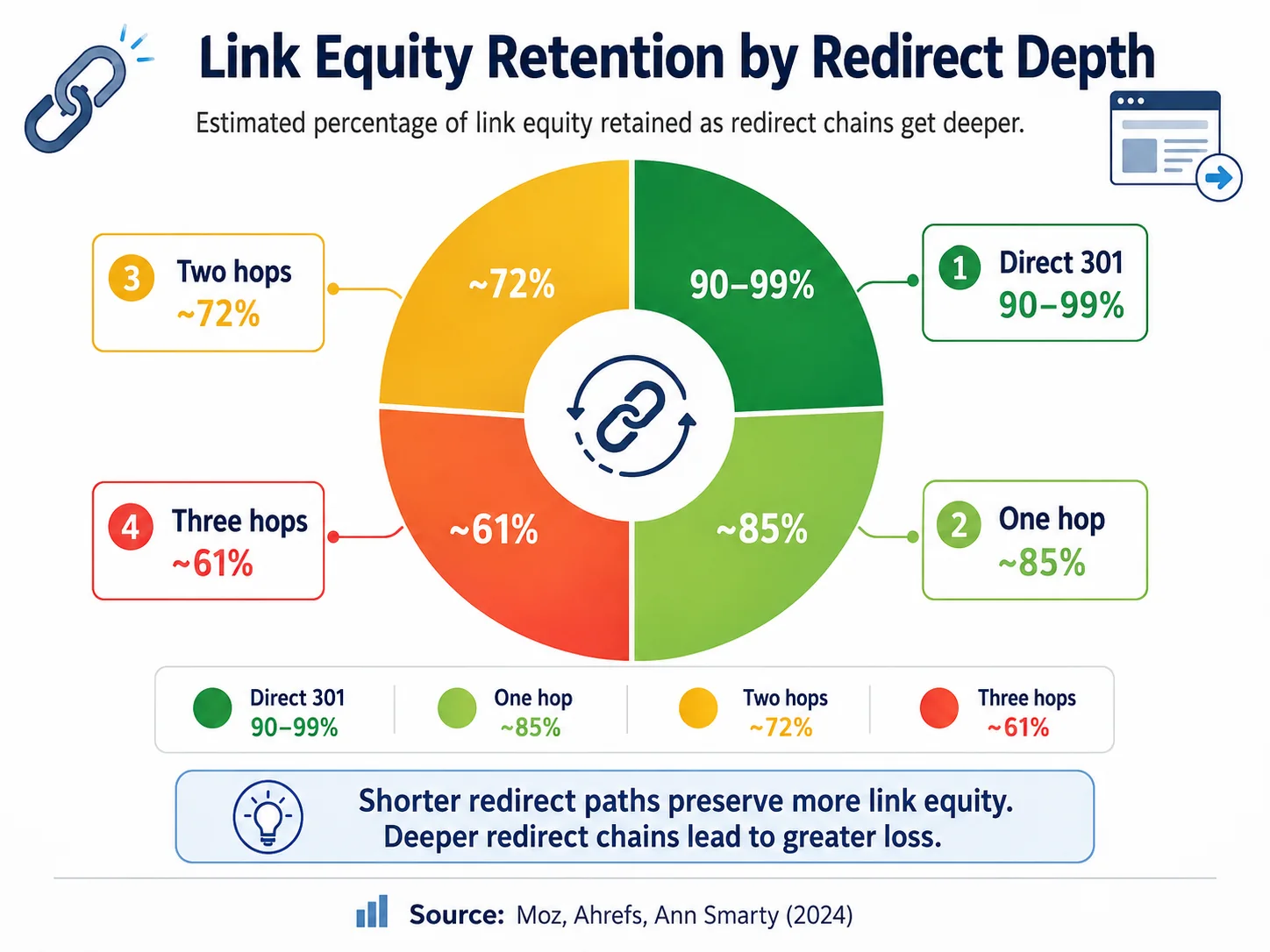
- 301 redirects transfer 90–99% of link equity, but each extra hop in a chain costs ~15% of organic traffic.
Tip 1: Choose a Domain Name That Balances Brand and Keyword Clarity
A 2025 study of 500 search results found that exact-match domains (EMDs) require 60% lower Domain Rating than non-EMD sites to reach the top 10 — but 70% of those EMDs rank only for their exact-match keyword, stunting broader growth (SEO Examples, 2025). The implication is clear: a pure keyword domain gives you a quick win in a narrow lane. A brand-forward domain with a keyword hint gives you both.

The winning formula is partial-match branding. Include one primary keyword in your domain only if it reads naturally and doesn't feel spammy. Think SlimPayroll.com rather than bestcheappayrollsoftware.com. Keep the domain under 15 characters, avoid hyphens (they erode trust signals), and choose something a person could spell after hearing it once.
Our observation: Sites that pair a brandable name with a single descriptive keyword consistently outperform pure EMDs for head terms after 12 months — the initial EMD boost fades, but brand authority compounds.
Tip 2: Always Use HTTPS — It's a Confirmed Google Ranking Signal
Google confirmed HTTPS as a ranking signal back in 2014, and as of 2025, it's no longer optional — it's baseline hygiene. In 2024, eCommerce brands that migrated from HTTP to HTTPS reported up to 7% organic traffic increases within 30 days (NameSilo Blog, 2025). For competitive niches, that edge is the difference between page one and page two.
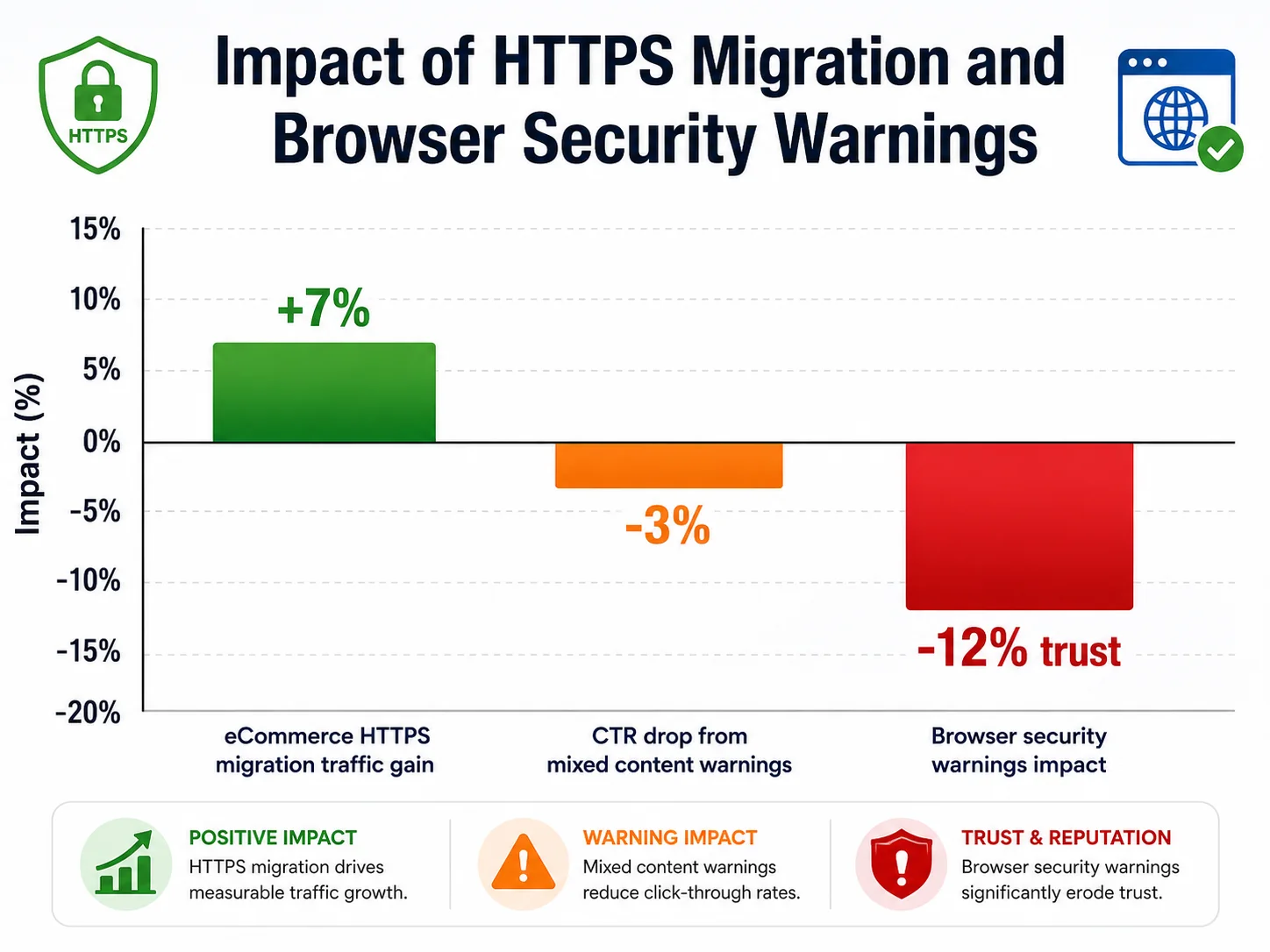
Beyond the ranking bump, HTTPS prevents browsers from labelling your site "Not Secure" — a warning that kills click-through rates before you even compete in the SERP. Set up an SSL certificate (free via Let's Encrypt), fix any mixed-content issues by auditing every hardcoded http:// asset reference, and enable an HSTS header so browsers know to enforce HTTPS going forward.
Citation capsule: In 2024, eCommerce brands migrating from HTTP to HTTPS reported organic traffic increases of up to 7% within 30 days, according to the NameSilo Blog's SSL and SEO Performance analysis. Google has classified HTTPS as a confirmed ranking signal since 2014, and browser "Not Secure" labels further suppress CTR for non-HTTPS pages.
Tip 3: Pick the Right TLD for Your Target Audience
In 2025, nearly 44% of all websites worldwide ran on .com — and that dominance isn't arbitrary (Statista, 2025). Research shows .com has a 44% memorability score, meaning people are far more likely to recall and revisit a .com domain than any alternative. Google doesn't hand .com a direct ranking boost, but the indirect SEO benefits — higher CTR, stronger brand recall, and greater trust with broad audiences — are real.
That said, TLD choice isn't always .com-or-nothing.
- Country-code TLDs (ccTLDs) like .co.uk, .de, or .fr send a strong geo-relevance signal that helps you rank in local search results. If your entire business is regional, a ccTLD plus a local hosting setup can outperform .com for that market.
- Industry TLDs can lift niche CTR. One SaaS company switching from .com to .ai saw a 13% higher CTR for AI-related queries (NameBeta, 2024) — because the TLD itself signalled relevance to the audience.
- Avoid obscure TLDs for general-purpose sites. Users hesitate, and spam filters are more aggressive toward low-trust extensions.
The rule of thumb: default to .com for global or B2C brands, use ccTLDs for region-locked businesses, and consider niche gTLDs only when the extension is directly meaningful to your audience.
Tip 4: Decide Between www and Non-www — Then Never Waver
Google treats www.example.com and example.com as separate URLs. If both versions resolve and you haven't set a canonical preference, you're splitting your link equity between two addresses. It doesn't matter which version you choose — what matters is that you pick one, redirect the other with a permanent 301, and set the canonical tag on every page.
What we see in audits: A surprisingly large share of mid-size sites still serve both www and non-www without a redirect. When we run crawl analyses, this shows up as near-duplicate homepages competing against each other for the same keywords — an entirely self-inflicted authority split.
Implementation checklist:
- Choose your canonical version (www or non-www)
- Set up a 301 redirect from the non-preferred version in your server config or .htaccess
- Add <link rel="canonical" href="https://www.example.com/" /> to every page
- Verify your preferred version in Google Search Console
- Update your XML sitemap to reference only the canonical URLs
Citation capsule: Google treats www.example.com and example.com as distinct URLs. Sites serving both without a canonical redirect effectively split their domain authority across two addresses. A single 301 redirect from the non-preferred version consolidates all incoming link equity — a zero-cost authority gain documented across hundreds of site audits.
Tip 5: Use Subdirectories Instead of Subdomains for Most Content
In 2023, Monster.co.uk migrated its country-specific job listings from subdomains (jobs.monster.co.uk) into subdirectories under the main domain. The result: a 116% increase in search visibility (SE Ranking & GA Agency, 2023). The same pattern appears consistently across large-scale SERP studies — subdirectories outperform subdomains for content that belongs on the main site.
The reason is authority concentration. When your blog lives at blog.yourdomain.com, Google can treat it as a separate site with its own trust evaluation. When it lives at yourdomain.com/blog/, every backlink the blog earns boosts the entire domain.
When subdomains make sense (the short list):
- Genuinely separate products or platforms (e.g., app.yourdomain.com)
- International sites with separate hreflang strategies
- Staging/development environments (staging.yourdomain.com)
When to use subdirectories (almost everything else):
- Blog, news, or resource center
- Help documentation
- Case studies and landing pages
- Country or language variants (when managed without hreflang subdomains)
If your blog is currently on a subdomain, plan a migration. It won't happen overnight, but the authority consolidation payoff compounds over months.
Tip 6: Build Domain Authority Through Quality Backlinks
In 2025, the average DA of a #1 Google ranking page was 71, versus DA 49 for a #10 position — and for every 10-point increase in Domain Authority, sites see an average 15% improvement in their ability to rank for moderately competitive keywords (RankTracker, 2025). Backlinko's analysis of 11.8 million search results found the top-ranked page has 3.8x more backlinks than pages in positions #2–#10.
The uncomfortable truth: 95% of all web pages have zero backlinks. If you're not actively building links, you're effectively invisible for competitive terms.
Link building approaches that still work in 2026:
- Digital PR — publish original data, surveys, or studies. Journalists link to primary sources.
- Resource page link building — identify pages in your niche that link out to useful tools and guides, then pitch your best content.
- Broken link building — find broken links on authority sites, offer your content as a replacement.
- Expert quotes and roundups — contribute quoted expertise to roundups; they almost always link back.
What doesn't work: buying links, link farms, reciprocal link schemes, or low-quality directory submissions. These trigger algorithmic penalties that take months to recover from.
Citation capsule: According to RankTracker's Domain Authority Statistics (2025), the #1 position in Google averages a Domain Authority of 71 — 45% higher than a position-10 result. Backlinko's 11.8-million SERP analysis found the top-ranking page has 3.8x more referring domains than positions 2–10, confirming that backlink quantity and quality remain the clearest correlate of first-page dominance.
Tip 7: Protect Domain Continuity and Avoid Unnecessary Migrations
Google's John Mueller confirmed in 2019 that domain age itself is not a ranking factor — what actually drives the correlation between older sites and higher rankings is the accumulation of backlinks, content, trust signals, and brand mentions over time (Search Engine Journal, 2024). But here's the practical implication: if you blow up that accumulated trust through an unnecessary domain migration, you're starting the compounding cycle from scratch.
Only 1 in 10 website migrations result in improved search engine rankings. Nine out of ten fail (Numen Technology, 2024). Most failures trace back to broken redirects, incomplete link equity transfer, or crawl issues that persist for months after launch.
When a migration is worth it:
- Legal requirement to rebrand
- Domain associated with a manual penalty that can't be resolved
- Merger or acquisition requiring unified branding
When to skip the migration:
- You "just want a fresh start"
- You found a shorter or catchier domain
- Current domain doesn't include a keyword you want
If you must migrate, implement a full 301 redirect map before switching, submit the change-of-address in Google Search Console, update all backlinks you control (social, directories, partner sites), and monitor rankings weekly for at least 90 days.
Tip 8: Eliminate Redirect Chains Before They Cost You Traffic
301 redirects are essential for consolidating authority — they typically transfer 90–99% of link equity, according to studies by Moz and Ahrefs. But chains erode that efficiency fast: each additional hop in a redirect chain costs approximately 15% of organic traffic (Ann Smarty / Rankability, 2024). A URL that goes A → B → C → D loses roughly 37% of the traffic that would have reached it via a direct redirect.
How to audit and fix redirect chains:
- Run a crawl with Screaming Frog, Ahrefs Site Audit, or Sitebulb
- Filter for URLs returning a 3xx status with more than one redirect hop
- Update each chain to point directly from the original URL to the final destination
- Verify with curl -I [URL] that each redirect resolves in a single step
- Check your XML sitemap — it should contain only the final destination URLs, never redirecting URLs
Use 301 (permanent) for all content that's moved for good. Use 302 (temporary) only for short-term redirects like A/B tests or geo-routing. Never use meta refresh — it passes no link equity and confuses crawlers.
Frequently Asked Questions
Does changing my domain name hurt SEO?
Yes, significantly — and permanently if done poorly. Only 1 in 10 domain migrations results in improved rankings (Numen Technology, 2024). You should migrate only for legal or penalty-related reasons. If you do migrate, implement full 301 redirects, submit a change-of-address in Google Search Console, and monitor rankings daily for 90 days.
How long does it take to build domain authority?
Domain Authority isn't built overnight. Sites that consistently publish quality content and earn backlinks see meaningful DA gains within 6–12 months. Each 10-point DA increase corresponds to roughly a 15% improvement in ranking ability for mid-competition keywords (RankTracker, 2025). Patience and consistent link acquisition are the only reliable levers.
Is a .com domain better for SEO than a .io or .co?
Google doesn't give .com a direct ranking boost over other gTLDs. However, .com scores 44% higher on memorability tests than other TLDs (Statista, 2025), which indirectly improves CTR and brand recall — both of which influence ranking. Use .com for broad audiences. Use ccTLDs for geo-specific targeting. Use niche TLDs (.ai, .io) only when they're meaningful to your audience.
Should I put keywords in my domain name?
Only if they fit naturally. EMDs require 60% lower Domain Rating to reach the top 10 (SEO Examples, 2025), which sounds great — but 70% of those EMDs rank only for their exact-match term. A partial-match brand domain (e.g., SlimPayroll.com) gives you both the keyword signal and the room to rank broadly.
What's the fastest domain SEO win?
Fix your redirects. If you have chains (A → B → C), collapsing them to direct 301s recovers approximately 15% of lost organic traffic per hop with zero content work required (Ann Smarty, 2024). It's a pure technical fix that pays off in weeks.
Conclusion
Your domain is the highest-leverage layer of your SEO stack. The eight tips above — from choosing a name that balances brand and keyword clarity, to enforcing HTTPS, selecting the right TLD, canonicalizing your preferred URL version, keeping content in subdirectories, building backlinks deliberately, protecting domain continuity, and cleaning up redirect chains — all work together to compound your authority rather than dilute it.
None of this is glamorous. It won't show up in a social media post the way a viral piece of content might. But six months from now, the sites that get these fundamentals right are the ones your competitors will be wondering how to catch up with.
Start with your fastest win: run a redirect audit today. If you find chains, fix them. Then work through the list from the top — domain name, HTTPS, TLD, canonical, structure, authority, continuity — and treat each as a foundation block rather than a one-time checkbox.