
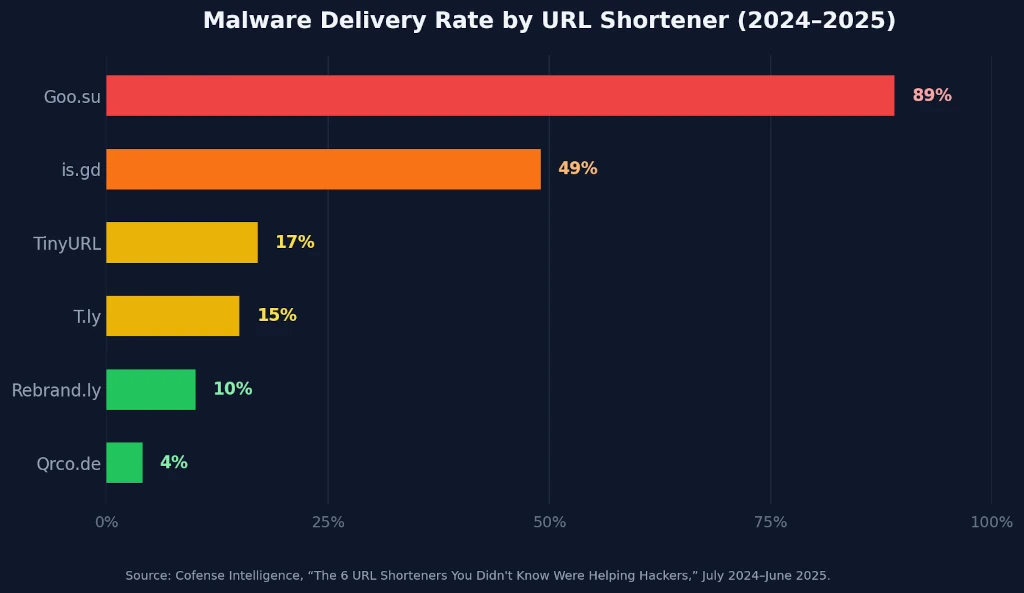
In 2025, Cofense Intelligence spent twelve months tracking phishing campaigns and found that 28% of all campaigns using the six most commonly abused URL shorteners delivered active malware — password-stealing trojans like Lumma Stealer, Pure Logs Stealer, and the Remcos remote access tool. One Russian-linked shortener, Goo.su, delivered malware in an astonishing 89% of its tracked campaigns. And the problem isn't slowing down: Palo Alto Networks Unit 42 recorded more than 11,000 malicious QR code shortener detections per day in early 2026, a 44% increase from the prior year.
Shortened links hide everything. You see bit.ly/x7kQp and you've no idea whether you're heading to a news article or a credential-harvesting page designed to look like your bank. That's exactly what a URL unshortener is built to fix.
This guide walks you through how URL unshorteners work, which free tools to use, and the five-step process for safely previewing any shortened link — whether it arrived by email, SMS, QR code, or social media. No software to install. Works on any device.
What Is a URL Unshortener — and Why Do You Need One?
In 2024, the global URL shortening services market was valued at USD 2.0 billion, with projections to reach USD 4.53 billion by 2032 at a 10.5% CAGR (Verified Market Research, September 2025). Bitly, TinyURL, is.gd, and dozens of competitors compress long URLs into short, shareable strings used legitimately by marketers, journalists, and social platforms. The same infrastructure, however, is freely available to anyone — including phishing operators.
A URL unshortener — also called a link expander or redirect resolver — follows the redirect chain of a shortened URL without loading any content in your browser. It reports the full final destination address so you can evaluate the link safely, with zero risk of drive-by downloads, cookie theft, or phishing page loads.

Here's why the redirect chain matters, not just the final URL: attackers often route links through two or three intermediate hops. The first hop may pass through a legitimate-looking marketing redirect service, which cleans the link's reputation score, before bouncing to a malicious phishing page on the final hop. An unshortener exposes every step in that chain.
There's also a privacy dimension. In August 2023, Kaspersky's security blog confirmed that every click on a shortened link transmits your IP address, geographic location, device type, and browser fingerprint to the shortener's servers — before you even reach the destination (Kaspersky, 2023). Using a URL unshortener eliminates that exposure entirely — the tool's server makes the request, not yours.
How Dangerous Are Shortened URLs in 2026?
In 2025, Cofense Intelligence analyzed 12 months of active phishing campaign data and found that malware delivery rates across the six most-abused URL shorteners ranged from 4% to 89% of observed campaigns — these weren't fringe services; several are freely available to legitimate businesses and marketers.
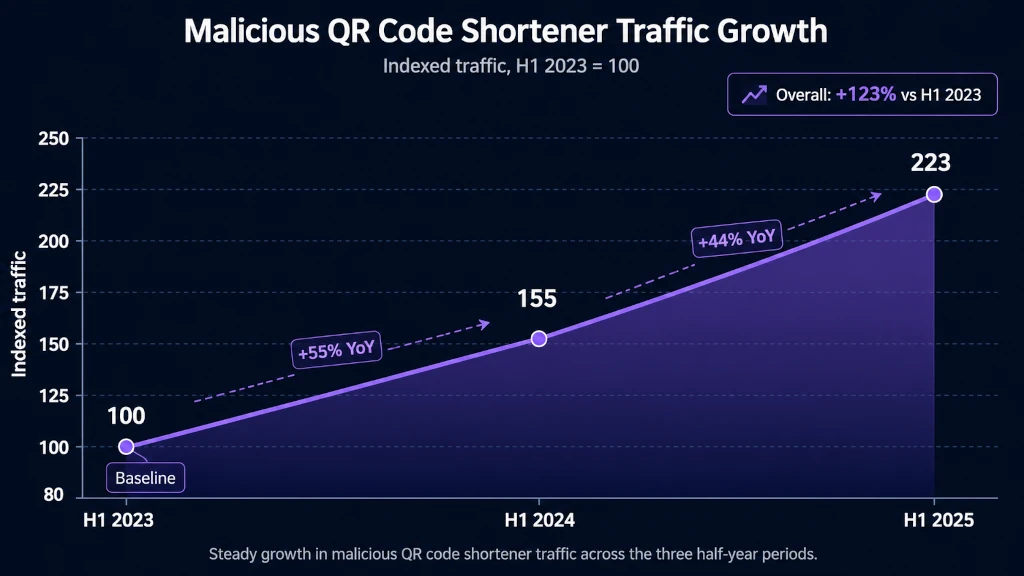
The threat isn't limited to email links. In February 2026, Palo Alto Networks Unit 42 documented that malicious QR code shortener traffic — links generated when users scan a QR code — grew 55% from H1 2023 to H1 2024, then another 44% from H1 2024 to H1 2025. Their telemetry exceeded 11,000 detections per day, and 15% of all pages linked through QR codes contained malicious content (Palo Alto Networks Unit 42, 2026).
According to Cofense Intelligence's 2024–2025 threat report, 28% of phishing campaigns using the six most commonly abused URL shorteners delivered active malware — trojans capable of stealing stored passwords and establishing persistent remote access. Goo.su, a Russia-based shortener freely available online, delivered malware in 89% of tracked campaigns, making it among the most dangerous free link tools in active use. (Cofense Intelligence, 2025)
The picture gets broader when you add phishing volume: 3.4 billion phishing emails are sent globally every day, and URLs appeared in malicious messages four times more often than attachments in recent years (Keepnet Labs, 2026). Shortened URLs are a preferred delivery format because they bypass domain-reputation filters — the shortener's own domain is typically clean, and the malicious redirect only activates after the click.
How to Unshorten Any URL: 5-Step Safety Process
Most people assume antivirus software will catch malicious links before damage occurs. It won't — not always. In 2026, 80% of phishing sites use HTTPS (Keepnet Labs, 2026), which means the padlock icon everyone trusts offers zero protection against shortened malicious links. Here's the process that actually works.
Step 1: Copy the Shortened URL — Don't Click It
By the end of this step, you'll have the shortened URL on your clipboard, ready to analyze, without exposing your browser to a single redirect.
- On desktop: Right-click the link and select Copy Link Address (Chrome/Firefox) or Copy Link (Safari). The link is now in your clipboard — don't open it yet.
- On mobile: Long-press the link until a context menu appears, then tap Copy Link. If the link is inside a text message, press and hold the URL text itself.
- In email clients: Most modern clients (Gmail, Outlook, Apple Mail) show the destination URL in the status bar when you hover over a link on desktop. That preview is your first sanity check — but still unshorten before clicking.
Verification: Open a plain text editor (Notepad, TextEdit) and paste. Confirm you have a shortened URL — something like https://bit.ly/xxxxx or https://t.co/xxxxx — and not the full destination address.
Watch out for subdomain tricks: In testing, we found shortened URLs that disguise themselves with subdomain formatting — a link might display as support.bit.ly/verify and look trustworthy at first glance. The subdomain is purely cosmetic; the actual redirect still originates from the path following the shortener domain. Copy the full URL string, not just the domain you see in preview.
Step 2: Paste Into a URL Unshortener Tool
By the end of this step, you'll have the full destination URL — along with every intermediate redirect hop — displayed on screen without loading anything in your browser.
- Open one of the free tools in the comparison table below. SeoPerc URL Unshortener is the fastest for beginners.
- Paste the shortened URL into the input field.
- Click Check or Expand URL or Unshorten.
- Wait 2–5 seconds while the tool follows the redirect chain server-side.
Verification: The tool returns a full URL beginning with https:// or http:// and a recognizable — or unfamiliar — domain name. If it returns an error or the redirect loops, treat the link as suspect.
Step 3: Inspect the Full Redirect Chain
By the end of this step, you'll understand not just the destination but every hop the link makes on the way there.
- Count the number of redirects. One hop (shortener → destination) is normal. Two or more intermediate hops may indicate layered obfuscation.
- Check the intermediate domain names. Are any unfamiliar? Attackers often route through marketing redirect services (e.g.,
click.mailservice.com) to clean the link's reputation before the final malicious destination. - Examine the final domain for typosquatting — subtle misspellings that impersonate trusted brands. Common patterns:
paypa1.com,arnazon.com,g00gle.com.
Verification: You can fully read and evaluate the destination without having loaded a single page.
Step 4: Run a Threat Check on the Destination URL
By the end of this step, you'll have a third-party safety verdict on the final domain — a second layer of confirmation beyond visual inspection alone.
- Copy the expanded final URL from the unshortener tool output.
- Paste it into VirusTotal (scans against 70+ security vendors) or Google Safe Browsing.
- Review the verdict. A clean result doesn't guarantee safety — brand-new malicious domains may not be indexed yet — but a flagged result is a definitive warning: do not visit.
Verification: Both tools return a pass/fail verdict in seconds. A "no unsafe content found" from both is your green light to proceed to Step 5.
Step 5: Decide Whether to Visit — and How
By the end of this step, you'll have a reasoned go/no-go decision and, if you choose to visit, a safer method for doing so.
- If the URL looks suspicious or was flagged: Don't visit. Report the original message as phishing or spam, and delete it.
- If the URL looks legitimate but you're unsure: Open it in a private/incognito window. This limits cookie exposure and prevents session hijacking if the site attempts cross-site scripting.
- If the URL is clean and expected: Visit normally.
Verification: You've completed a full link safety review in under 60 seconds, without relying on antivirus software alone — and without sharing any of your personal device data with the shortener's servers.
Best Free URL Unshortener Tools in 2026
In 2025, TinyURL held 91.52% of tracked URL shortener deployments, making it the single most common shortener on the web by volume. Market dominance doesn't mean safety — it means it's the most frequently abused by campaign volume. Every one of these tools below works on TinyURL, Bitly, is.gd, T.ly, and every other major shortener service.
| Tool | Full Redirect Chain | Safety Score | Mobile-Friendly | Free |
| CheckShortURL.com | ✅ Yes | ✅ Multi-engine | ✅ Yes | ✅ Yes |
| SeoPerc URL Unshortener |
✅ Yes | ✅ Multi-engine | ✅ Yes | ✅ Yes |
| GetLinkInfo.com | ✅ Detailed (all hops) | ❌ No | ✅ Yes | ✅ Yes |
| Unshorten.It | ✅ Yes | ⚠️ Basic | ✅ Yes | ✅ Yes |
| VirusTotal (URL) | ⚠️ Partial | ✅ 70+ engines | ✅ Yes | ✅ Yes |
| Redirect Detective | ✅ Full chain | ❌ No | ✅ Yes | ✅ Yes |
| URL2PNG | ❌ No | ❌ No (screenshot only) | ✅ Yes | ⚠️ Limited |
Recommended combination: Use CheckShortURL.com for a quick first pass (redirect chain + safety flags), then run the destination URL through VirusTotal if anything looks even slightly off. This two-tool approach takes under 30 seconds and covers both redirect-chain transparency and multi-vendor threat intelligence.
In February 2026, Palo Alto Networks Unit 42 documented that malicious QR code shortener detections exceeded 11,000 events per day, representing 44% growth from H1 2024 to H1 2025 and 55% from H1 2023 to H1 2024. With 15% of pages linked through QR codes containing malicious content, smartphone users who scan QR codes in public spaces — restaurants, transit stops, retail — face the highest real-world risk from obfuscated shortened destinations. (Palo Alto Networks Unit 42, 2026)
The Privacy Tracking Problem Nobody Talks About
Shortened URLs don't just risk malware — they harvest data from everyone who clicks them. In 2023, Kaspersky's security team confirmed that shortener services function as invisible analytics intermediaries: your IP address, precise geographic location, device type, operating system, and browser are all transmitted to the shortener's servers before you ever reach the destination page (Kaspersky, 2023).
With mobile devices now accounting for 58.7% of global web traffic (InnerSpark Creative, citing StatCounter, 2025), that's a massive ongoing passive-surveillance layer built into everyday link-sharing. Every social media post, newsletter, and SMS that uses a shortened link is feeding analytics dashboards — and in malicious hands, intelligence for follow-up attacks.
What others miss — a less-obvious risk: Shortener analytics can be weaponized for spear phishing. If an attacker sends a shortened URL to a corporate email list and 40 people click it, the shortener analytics reveal device types, office IP ranges, browser versions, and approximate locations. That click-through data gives the attacker a roster of which employees use mobile vs. desktop, which operating systems to target, and which geographic clusters are active. Unshortening a link eliminates click-through entirely — the shortener's server never sees your request.
This is why unshortening isn't just a security practice — it's a privacy one. The unshortener service sends the HTTP request from its own server. Your device stays invisible to the shortener infrastructure throughout.
Common Mistakes People Make When Checking Shortened URLs
In 2026, 80% of phishing sites use HTTPS (Keepnet Labs, 2026), which means the single most common safety signal people rely on — the padlock — provides no protection against malicious shortened links. Don't let these five mistakes leave you exposed.
- 1. Trusting the HTTPS padlock on the destination
- HTTPS encrypts the connection — it says nothing about whether the site is trustworthy. Attackers routinely register and HTTPS-enable phishing domains within hours of a campaign launch. The padlock is a transport-layer property, not a site-trust signal. Always run a safety scan alongside visual checks.
- 2. Checking only the final URL and ignoring the redirect chain
- The final destination domain can look spotless while an intermediate hop harvests session cookies or injects browser fingerprinting scripts. GetLinkInfo.com and Redirect Detective expose every HTTP hop — use them when a link arrives from an unknown or unexpected sender.
- 3. Assuming major branded shorteners are safe by default
- TinyURL held 91.52% market share in 2025, making it the most abused shortener by absolute campaign volume. Being the biggest brand doesn't mean being the safest — anyone can create a TinyURL link in seconds, pointing to anything. Check every shortened link regardless of which service shortened it.
- 4. Only unshortening on desktop and skipping mobile
- Most people use link-checking tools exclusively on desktop, but over 58% of web traffic is mobile — and smishing (SMS phishing) campaigns specifically target smartphone users because they're less likely to stop and preview a link. Bookmark CheckShortURL.com in your phone's browser right now. It takes 5 seconds to do and you'll use it more than you expect.
- 5. Treating a one-time clean scan as permanent clearance
- Attackers sometimes register clean domains, distribute links, and only redirect to malicious content after accumulating initial traffic and reputation. If you received a shortened URL that was clean a week ago, re-check it before forwarding it to others — the destination may have changed.
Frequently Asked Questions
What is a URL unshortener?
A URL unshortener is a tool that reveals the full destination address hidden behind a shortened link like bit.ly or TinyURL. It follows the redirect chain on its own servers and returns the final URL so you can evaluate it without your browser loading anything. Most free tools return results in under five seconds, and they work on any device.
Are shortened URLs always dangerous?
No — shortened URLs are used legitimately by marketers, journalists, and social platforms every day. The risk is real but selective: Cofense Intelligence (2025) found 28% of phishing campaigns using popular shorteners delivered malware. The danger spikes when links arrive unsolicited by email, SMS, or QR code from unknown senders. When in doubt, unshorten before you click.
What's the best free URL unshortener for beginners?
CheckShortURL.com is the easiest starting point — it shows the full redirect chain and runs safety checks via multiple threat engines in a single screen. For deeper technical inspection, GetLinkInfo.com shows every HTTP hop with status codes. Pair it with VirusTotal for destination-URL threat scanning against 70+ security vendors. All three are free and require no account.
Can I unshorten a URL on my phone?
Yes — all the tools above are mobile-friendly web apps. This matters more on mobile than desktop: 58.7% of global web traffic comes from smartphones (StatCounter, 2024), and SMS phishing and QR code attacks disproportionately target mobile users. Bookmark CheckShortURL.com in your phone's browser so you can check any suspicious link in seconds.
Will unshortening a URL protect me from malware?
Unshortening reveals where a link goes, but it doesn't block threats if you choose to visit anyway. Use it alongside a reputable security suite — Kaspersky, Norton, Malwarebytes — and never visit a destination flagged by VirusTotal or Google Safe Browsing, even if the URL looks plausible. Unshortening is prevention; security software is the safety net.
Take Control of Every Link You Click
Shortened URLs aren't going away — the market will nearly double to USD 4.53 billion by 2032. But with 28% of campaigns using popular shorteners actively delivering malware, and QR code shortener attacks growing 44% year over year, clicking without checking is a gamble you don't need to take. The five-step process in this guide takes under 60 seconds, works on any phone or computer, and requires no software installation.
Start today: bookmark SeoPerc URL Unshortener on your phone and desktop right now. The next suspicious link you receive will meet knowledge — not chance.