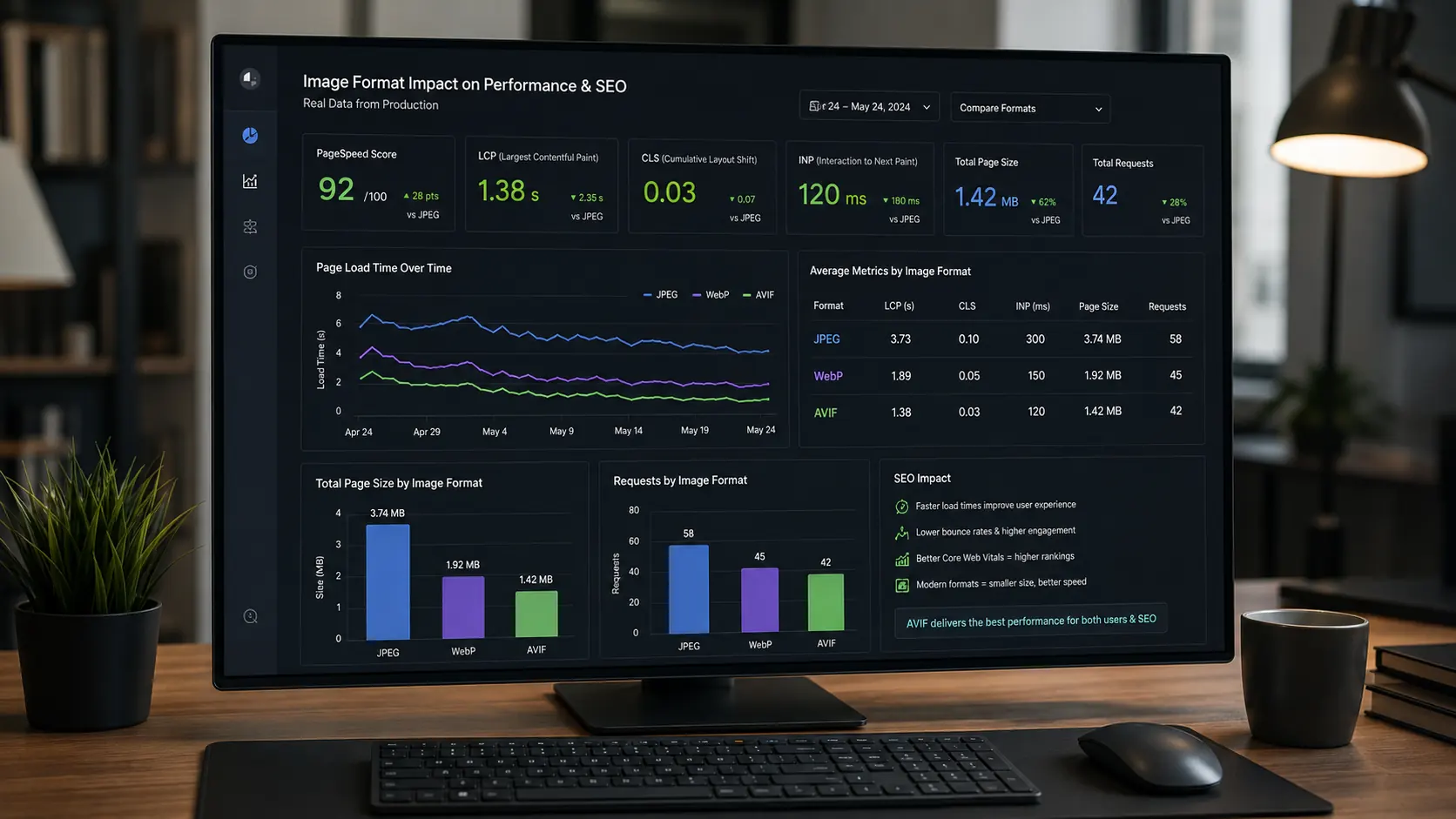
In the HTTP Archive Web Almanac 2025, images were the LCP content type on 76.0% of mobile pages and 85.3% of desktop pages. That single stat makes image format one of the highest-leverage technical SEO decisions you can make. And yet JPEG — engineered in 1992 — still runs on 71.2% of all websites as of May 2026 (W3Techs), while WebP sits at just 20.3% adoption despite clear performance advantages proven since 2010.
The format you serve for your images isn't a cosmetic preference. It's a direct input into LCP and bandwidth consumption, and because Core Web Vitals are part of Google's page experience signals, image performance can contribute to search success when other ranking factors are competitive. This comparison cuts through the noise: file size, browser support, LCP impact, implementation complexity, and real SEO consequences, all benchmarked with current data so you can make a clear decision for your site in 2026.
WebP vs JPEG at a Glance
Before getting into the category breakdowns, here's the full side-by-side comparison. The performance, adoption, and support claims use specific sourced numbers instead of vague ratings.
| Category | JPEG | WebP |
| Typical file size | Baseline (100%) | ~70–75% of JPEG (25–34% smaller) |
| Browser support | 100% (all browsers) | 95.57% globally (May 2026) |
| Website adoption | 71.2% of all websites | 20.3% of all websites |
| Share of LCP images | 57% of desktop LCP images (2025) | 11% of desktop LCP images (2025) |
| Transparency (alpha) | No | Yes |
| Animation support | No | Yes |
| Lossless mode | No for standard web JPEG/JFIF | Yes (lossy + lossless) |
| Encoding speed | Generally faster | Usually slower to encode, depending on settings |
| CMS / CDN support | Universal | WordPress 5.8+, Cloudinary, Shopify, Squarespace, Cloudflare |
| Best for | Email, print-to-web workflows, legacy toolchains | Web delivery — all modern site types |
| Overall verdict | Fallback format | Default for web delivery |
Sources: W3Techs JPEG/WebP usage reports (May 2026), Can I Use WebP support data (April/May 2026), HTTP Archive Web Almanac 2025, Google WebP Compression Study, WordPress 5.8 release notes, Shopify Help Center, Squarespace Help Center, Cloudinary docs, and Cloudflare Polish docs.
Which Format Produces Smaller Files?
Google's WebP compression study confirms WebP files are 25–34% smaller than JPEG at equivalent SSIM quality scores — and it isn't close. At a quality setting of 75 (a common web default), a WebP file encodes the same perceptual quality in roughly 70% of the bytes a JPEG requires. A 400 KB hero image in JPEG becomes a 270–300 KB WebP without any visible quality degradation.
The practical impact compounds across a full page. HTTP Archive's 2024 Web Almanac found that the median desktop page loads 18 images, the median mobile page loads 16 images, and the median homepage loads 20 images. Trim many of those images by a quarter and you're reducing hundreds of kilobytes from a typical page view — lowering image transfer time, reducing LCP resource load duration, and cutting bandwidth costs at scale.
JPEG's one compression argument: it is a mature, heavily optimized lossy format, and when compared against modern encoders such as MozJPEG at high quality settings, WebP's advantage can narrow. But WebP supports both lossy and lossless modes, and Google's benchmark data still shows a clear file-size advantage over standard JPEG at equivalent SSIM quality.
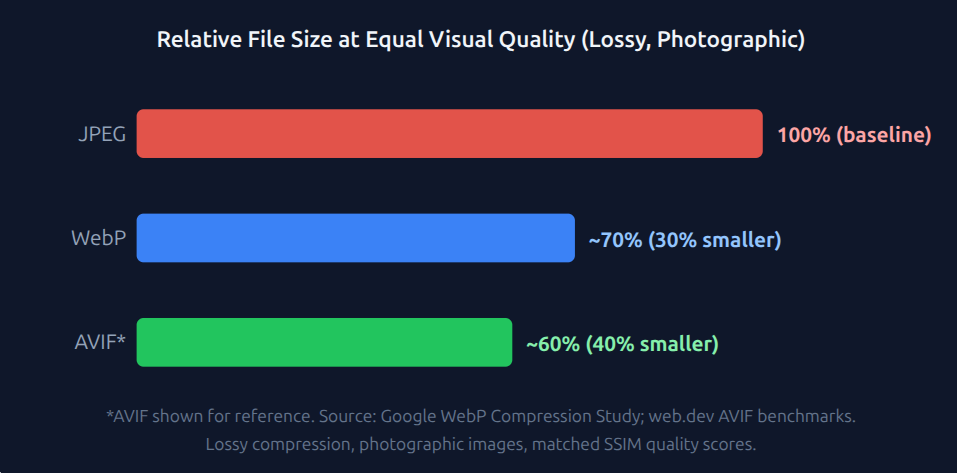
Verdict: WebP usually wins on compression for web delivery. The 25–34% file-size advantage is well supported by Google's benchmark against JPEG at equivalent SSIM quality, but real-world savings vary by image type, encoder, and quality settings. JPEG remains useful as a fallback and in legacy workflows, but WebP is normally the stronger default for modern web images.
Which Format Loads Faster and Improves LCP?
In 2025, only 62% of mobile pages achieved a "good" LCP score — meaning their Largest Contentful Paint completed in under 2.5 seconds — up from 59% in 2024 (HTTP Archive Web Almanac 2025). That means 38% of mobile pages still missed the good LCP threshold. And because images are the LCP content type on 76.0% of mobile pages and 85.3% of desktop pages, image optimization remains one of the most important levers for improving LCP.
How does format connect to LCP?
Google's web.dev documentation explains that switching to a more efficient format such as AVIF or WebP can reduce LCP resource load duration — the part of LCP affected by how long the browser spends downloading the LCP resource. Separately, discovery and priority optimizations such as making the image available in the initial HTML, avoiding lazy loading on the LCP image, and using fetchpriority="high" where appropriate can reduce LCP resource load delay.
When your LCP image is a JPEG, switching it to WebP can reduce the download size of that render-critical image by up to about one third. On a 3G-like connection around 1.5 Mbps, a 400 KB JPEG takes roughly 2.1 seconds to transfer under ideal conditions; the same image as a 280 KB WebP takes roughly 1.5 seconds — a potential 600 ms saving before protocol overhead, latency, and browser scheduling are considered.
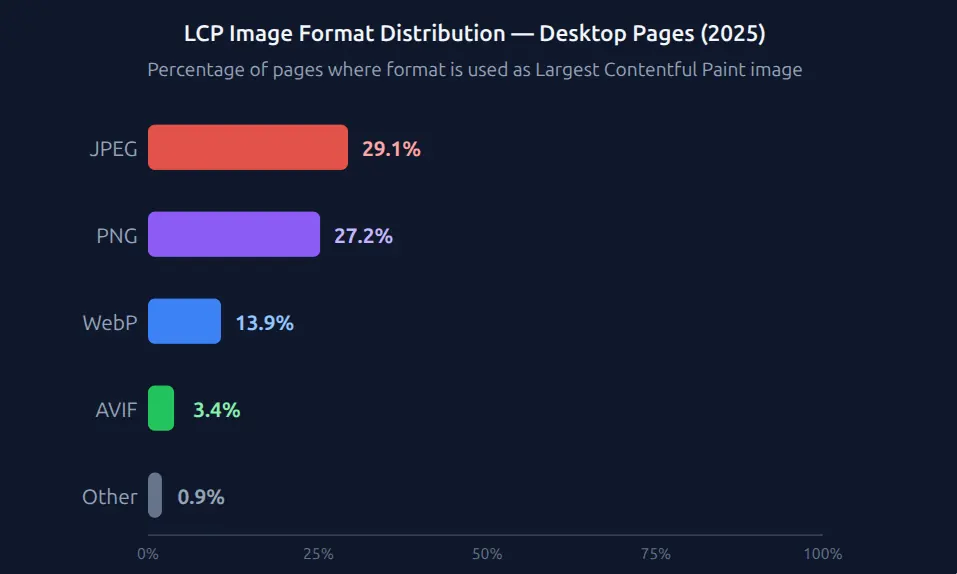
Despite clear performance advantages, only 13.9% of pages serve their LCP image in WebP — while JPEG dominates at 29.1%.
According to the HTTP Archive Web Almanac 2025 Performance chapter, only 13.9% of desktop pages serve their Largest Contentful Paint image in WebP format, while JPEG remains the dominant LCP format at 29.1%. Google's web.dev optimization guide identifies format modernization — switching to WebP or AVIF — as one of the two most direct methods to reduce LCP resource load duration, alongside fetchpriority="high" preloading for render-critical images. (HTTP Archive 2025; web.dev)
Verdict: WebP can improve LCP when the LCP image transfer is a real bottleneck. Smaller image files reduce LCP resource load duration, especially on slower connections. But format alone is not a complete LCP fix: you still need fast TTFB, early image discovery, correct priority, no lazy loading on the LCP image, and minimal render delay.
Which Format Has Better Browser Support in 2026?
WebP's browser support is now near-universal. As of May 2026, Can I Use shows WebP supported by 95.57% of browsers globally — 95.45% full support plus 0.12% partial support, based on April 2026 StatCounter usage data.
Internet Explorer never supported WebP, and the IE 11 desktop application ended support on certain versions of Windows 10 in June 2022, although Microsoft Edge IE mode remains available for legacy enterprise sites. Safari added WebP support in version 14 in 2020, with an important macOS caveat: Safari 14–15.6 requires macOS Big Sur or later. Chrome has supported WebP for more than a decade, and Firefox added support in 2019.
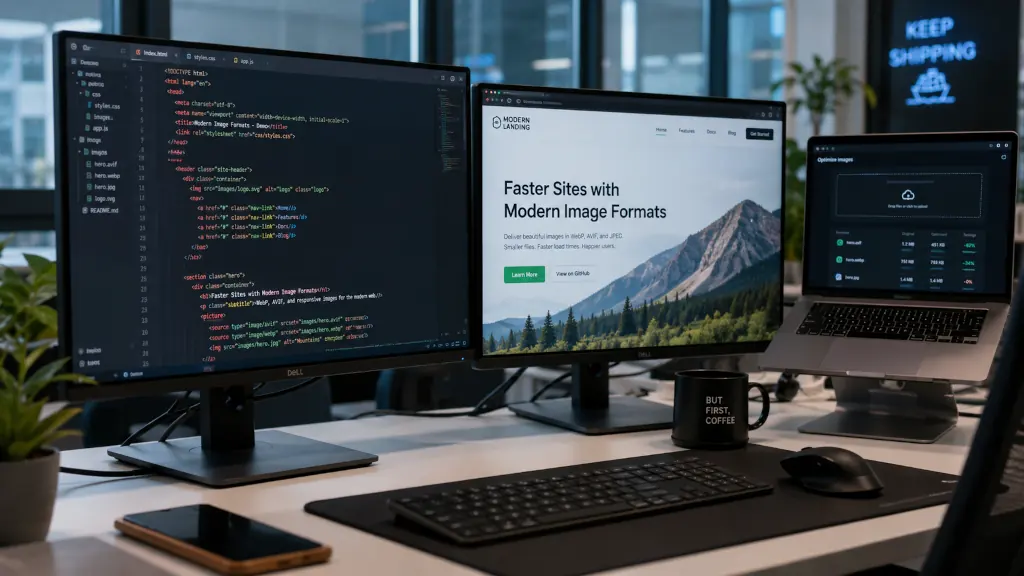
The remaining unsupported share mostly covers legacy browsers, older mobile environments, and locked-down enterprise configurations. For most websites, this is not a blocking concern — but it is still worth acknowledging. The good news: you do not have to choose between serving WebP and supporting old browsers. The HTML <picture> element lets you offer WebP to supported browsers and fall back to JPEG automatically, with no JavaScript and no server-side detection logic.
JPEG's near-universal coverage advantage is real, but rarely decisive for most public websites in 2026. Serving JPEG to every visitor to cover a small unsupported edge case means penalizing the WebP-capable majority with larger image downloads, slower resource loading, and weaker LCP potential — instead of using a simple fallback pattern.
Verdict: WebP wins in practice. The browser compatibility gap is small enough that it should not block WebP adoption for modern production websites. A <picture> element with a JPEG fallback closes the remaining gap at low implementation cost.
Does Your Image Format Directly Affect SEO Rankings?
In 2025, 62% of mobile pages passed the "good" LCP threshold — meaning 38% were still in the "needs improvement" or "poor" buckets (HTTP Archive Web Almanac 2025). LCP is one of Google's Core Web Vitals, alongside INP and CLS, and Core Web Vitals are used by Google's ranking systems as part of page experience. Switching an LCP image from JPEG to WebP is not a direct "use WebP = rank higher" shortcut. The real mechanism is more practical: WebP can reduce the LCP image's download size, which can reduce LCP resource load duration, which can improve page experience when image transfer time is a bottleneck.
Google's Search Central documentation does not say "use WebP to rank higher." What it does say is that Core Web Vitals are used by Google's ranking systems and that site owners should aim for good Core Web Vitals for Search success and user experience. Separately, web.dev's LCP optimization guidance explains that reducing the load time of the LCP resource is one of the core ways to improve LCP, and modern image formats such as WebP and AVIF can help reduce that resource load duration. Don't expect a dramatic rankings lift from format conversion alone; expect a measurable performance improvement that may contribute to a stronger page experience signal alongside relevance, content quality, intent match, links, and other ranking factors.
As of 2025, the HTTP Archive Web Almanac reports that only 62% of mobile pages score "good" on LCP, compared to 74% on desktop. Google's Search Central documentation says Core Web Vitals are used by its ranking systems, while web.dev's Optimize LCP guide explains that reducing the load time of the LCP resource is one of four high-level LCP optimization steps. For pages where a large JPEG hero image is the LCP element, converting that image to WebP or AVIF can be one of the faster practical ways to reduce LCP resource load duration. (HTTP Archive 2025; Google Search Central; web.dev)
Verdict: WebP can help SEO indirectly through page experience. The connection is documented but indirect: smaller LCP image files can reduce LCP resource load duration, and better Core Web Vitals can contribute to the page experience signals used by Google's ranking systems. For pages currently close to the "good" LCP threshold, converting a large hero image from JPEG to WebP may be a quick, high-impact improvement — but it is not a standalone ranking guarantee.
How Do You Implement WebP with a JPEG Fallback?
Switching to WebP without breaking older browsers can be a quick change if you use the HTML <picture> element — the standard approach for serving WebP to supported browsers while automatically falling back to JPEG for browsers that do not support it. You generate both file formats; the browser picks the right one. No JavaScript, no server-side detection.
<!-- Standard WebP with JPEG fallback -->
<picture>
  <source srcset="image.webp" type="image/webp">
  <img src="image.jpg" alt="Descriptive alt text" width="800" height="450" loading="lazy">
</picture>

<!-- LCP hero image: add fetchpriority="high" and loading="eager" -->
<picture>
  <source srcset="hero.webp" type="image/webp">
  <img src="hero.jpg" alt="Hero image description" width="1200" height="630"
       loading="eager" fetchpriority="high">
</picture>

<!-- Future-proof triple fallback: AVIF + WebP + JPEG -->
<picture>
  <source srcset="image.avif" type="image/avif">
  <source srcset="image.webp" type="image/webp">
  <img src="image.jpg" alt="Descriptive alt text" width="800" height="450" loading="lazy">
</picture>
Don't want to manage multiple file formats manually? You may not have to. WordPress 5.8+ supports uploading and displaying WebP images natively, but it does not automatically convert JPEG uploads to WebP by default; for that, use an image optimization plugin, CDN, or custom pipeline. Cloudinary, Imgix, and Cloudflare Images can detect browser support and serve AVIF, WebP, or fallback formats automatically. Shopify automatically determines the best supported image format for storefront delivery, including WebP and AVIF where supported. Squarespace converts uploaded images to WebP for site content, and Webflow can automatically serve WebP to supported browsers, with some exceptions such as OpenGraph images.
Generating WebP files yourself? Use cwebp -q 80 input.jpg -o output.webp from Google's open-source cwebp CLI. Quality 75–82 is the practical sweet spot for web photography — below 75, compression artifacts become visible in smooth gradients; above 85, file size savings diminish without meaningful quality gains. The sharp library (Node.js) and Pillow (Python) handle batch conversion efficiently for automated pipelines.
Verdict: Implementation isn't a barrier. A 3-line HTML change plus a converted file covers browser compatibility entirely. CDN-level solutions eliminate even that overhead for teams running on modern platforms.
Who Should Stick with JPEG?
WebP wins for most modern web delivery — but not every image workflow is web-only. There are three scenarios where JPEG may remain the safer call.
Print and email workflows. If images feed into a print pipeline or are embedded in HTML emails, JPEG is often safer. WebP support in email is inconsistent: some clients support it, some support it partially, and Outlook for Windows remains a common problem area. Print workflows also tend to expect established production formats such as JPEG, TIFF, PDF, or PNG. Keep JPEG or TIFF masters for non-web contexts; serve WebP on the web side via the <picture> element.
Legacy CMS environments without a practical upgrade path. If your CMS or hosting stack can't output a <picture> element or connect to a CDN with format negotiation, the implementation overhead may outweigh the benefit for a low-traffic site. This scenario is shrinking fast — WordPress 5.8+ supports uploading and using WebP images, and many modern commerce, website-builder, and Jamstack workflows can serve WebP through built-in image tools, plugins, or CDNs — but if you're genuinely locked out, don't force it.
High-volume server-side image generation pipelines. WebP encoding is usually more CPU-intensive than JPEG encoding, particularly when using higher-effort or lossless settings. If you're generating thousands of thumbnails per minute and encoding speed is already a bottleneck, benchmark before switching your entire pipeline. Lossy WebP can be several times slower than JPEG depending on encoder settings, image content, CPU, and implementation; whether that matters depends entirely on your throughput requirements.
For everyone else — a content site, e-commerce catalog, SaaS product, blog, or portfolio — WebP with JPEG fallback is usually a strong default for web image delivery in 2026. For maximum compression on modern browsers, you can also use AVIF first, then WebP, then JPEG fallback.
Frequently Asked Questions
Is WebP better than JPEG for SEO?
WebP doesn't carry a direct "format bonus" ranking factor, but it can improve page experience indirectly by reducing image transfer size. Google's WebP compression study found WebP files are 25–34% smaller than JPEG at equivalent SSIM quality, and in 2025 only 62% of mobile pages achieved a "good" LCP score (HTTP Archive Web Almanac 2025). If your LCP image is a large JPEG and image transfer time is a real bottleneck, converting it to WebP can reduce LCP resource load duration and may help the page move closer to the 2.5-second "good" threshold.
Does switching to WebP affect image quality?
Usually not in a noticeable way when the encoder and quality settings are chosen carefully, but there is no universal quality number that works for every image. WebP lossy compression is based on VP8 key-frame encoding and often produces smaller files than JPEG at equivalent SSIM scores. For many photographic images, WebP quality settings around 75–85 are a practical starting range, but you should visually test important images — especially gradients, screenshots, text-heavy graphics, and product photos where artifacts are easier to notice.
Is WebP supported in all browsers in 2026?
WebP is supported by 95.57% of browsers globally as of May 2026 (Can I Use). Full support covers Chrome, Firefox, Safari 14+, and modern Edge versions, although older Safari/macOS combinations can still be a caveat. The remaining unsupported share — mostly legacy browsers, older mobile environments, and locked-down enterprise setups — can be covered by a <picture> element with a JPEG fallback. Internet Explorer never supported WebP, and the IE11 desktop app ended support for Windows 10 Semi-Annual Channel in June 2022, although Microsoft Edge IE mode remains available for legacy enterprise sites.
Should I use WebP or AVIF?
AVIF often compresses better than WebP and JPEG, and web.dev notes that AVIF has shown greater than 50% savings versus JPEG in some cases. The trade-off is that AVIF encoding can be slower and support is still slightly less universal than WebP. HTTP Archive 2024 found AVIF at just 1.0% of mobile image format adoption, despite 386% relative growth since 2022. The recommended production pattern in 2026 is usually a triple fallback: AVIF first, WebP second, and JPEG as the final fallback.
Can I convert my existing JPEG images to WebP automatically?
Yes, but the exact method depends on your platform. WordPress 5.8+ supports uploading and displaying WebP images natively, but it does not automatically convert JPEG uploads to WebP by default; for that, use an image optimization plugin, CDN, or custom pipeline. Cloudinary, Imgix, and Cloudflare Images can serve AVIF, WebP, or fallback formats automatically when configured. For batch CLI conversion, Google's cwebp tool and Node.js's sharp library can convert entire directories at configurable quality settings. CDN-level solutions are often the lowest-friction path for existing catalogs.
The Verdict: WebP vs JPEG (2026)
| Category | Winner |
| File size / compression | WebP — 25–34% smaller at equal SSIM quality |
| LCP / page load speed | WebP — can reduce LCP resource load duration when image transfer size is the bottleneck |
| Browser support | JPEG — near-universal vs 95.57%; gap closed with <picture> fallback |
| SEO impact (Core Web Vitals) | WebP — indirect SEO benefit through better LCP/page experience when image size is the bottleneck |
| Encoding speed | JPEG — generally faster encoder for batch pipelines |
| Transparency / animation | WebP — alpha channel + animation support |
| Implementation complexity | Tie — <picture> is simple; CDN solutions can automate format delivery |
| Overall | WebP for web delivery (JPEG as fallback + non-web contexts) |
WebP wins on most dimensions that matter for web image delivery and performance in 2026. JPEG's main advantage — near-universal browser support — is mitigated by the <picture> element in a small amount of HTML. The real question isn't whether modern sites should serve WebP. It's why 57% of LCP images still run as JPEG when the compression data, tooling, and LCP optimization guidance all support modern image formats.
Start with your likely LCP image. Convert it to WebP, serve it with a JPEG fallback using <picture>, avoid lazy loading if it appears above the fold, add fetchpriority="high" only when it is the page's primary LCP candidate, and measure the LCP delta in Chrome DevTools or PageSpeed Insights. When image transfer size is the bottleneck, that single change can be one of the fastest practical ways to improve LCP; if TTFB, render delay, or resource discovery is the bottleneck, you will need to fix those separately.